

Send
Send digital assets to a service or platform.
Simply explained, step by step
No panic. You do not need to be a crypto expert.
Maybe this is the first time you have heard of a Web3 wallet. Or perhaps you already have one, but you are not yet sure how everything works. That is completely normal.
AURUM continues to evolve. More and more services use Web3 technology. As a result, you will use your own Web3 wallet more often to carry out digital transactions securely.
No difficult words. No technical detours. Just step by step.
After this guide, you will know:
Remember: “Every expert was once a beginner.” Take your time. Understand each step. That is the safest way to get started with Web3.
Because the financial world is changing
The way we handle money online continues to evolve.
In the past, we usually entrusted digital assets to one central party, such as a bank, exchange or payment platform. Web3 gives users more control over their own digital transactions.
You continue using AURUM services. Your own Web3 wallet is simply used more often to carry out certain actions securely.
Send digital assets to a service or platform.
Receive payouts directly in your own wallet.
Decide for yourself which transaction you confirm.
Access a Web3 service through your wallet.
You decide which actions you approve.
Transactions can be checked on the blockchain.
Fewer intermediate steps can speed up transactions.
Web3 is the foundation for digital financial applications.

Sometimes you use the wallet only to send or receive. Other services may also require you to approve a transaction or smart contract.
Remember: “Web3 does not change what you want to achieve.”It mainly changes how digital transactions are carried out.
From bank to wallet and back
Your money is not always in the same place. Once you understand the route, everything else becomes much easier.
Step 1
You send money from your bank account to a reliable crypto exchange. Check that both accounts are in the same name.
Step 2
An exchange is a digital currency exchange. For example, you can convert euros into a stablecoin such as USDC or USDT. Which asset is available or suitable depends on your exchange, region and the service you use.
As long as your stablecoin remains on the exchange, it is managed by the exchange.

Step 3
When you send a stablecoin to your own wallet, it comes under your own control. From that moment, you are responsible for its security.

Step 4
Depending on the service, you send digital assets or use your wallet to approve a transaction.
↔Step 5
A payout can arrive back in your wallet. You decide what to do next.
Why do we mainly use USDC in this guide?
USDC and USDT are both stablecoins designed to maintain approximately the same value as the US dollar. However, they are two different digital assets.
Within the European Economic Area, regulated providers mainly use stablecoins that can be offered under MiCA rules. That is why USDC remains the main example in this guide.
Outside Europe, USDT is also widely used. Which stablecoin you can use depends on your region, exchange, wallet, blockchain network and the Web3 service involved.
Remember: “Your money does not always follow the same route.”It can move between your bank, exchange, wallet and platform.
Your personal digital key
A Web3 wallet gives you access to digital assets and Web3 services.
 →
→ same idea→
The key is not your house. The key gives you access to your house.
A wallet works in the same way. The wallet is not the blockchain, but it gives you access to your digital assets and transactions on the blockchain.
Receive digital assets at your wallet address.
Send digital assets to another address.
Check and confirm transactions yourself.
Connect your wallet to a Web3 service.
No. A bank manages your account. With a Web3 wallet, you decide which transactions you carry out and approve.
No. Sometimes you hold digital assets through your wallet. Sometimes you only use the wallet to send, receive or approve something.
Remember: “Think of your wallet as your personal digital key to Web3.”
Wallet app versus blockchain
Your digital assets are not literally stored in the app. The wallet gives you access to what is recorded on the blockchain.
Shows information and allows you to carry out transactions.
Records digital assets, addresses and transactions.
No. It depends on the service. Sometimes digital assets are directly under your control. Sometimes you only use the wallet to send, receive, connect or approve.

This does not automatically mean your assets have disappeared.
Remember: “Your wallet gives you access to what is recorded on the blockchain.”
A personal choice
Most wallets perform the same basic functions. Choose a wallet that you understand and can learn to use safely.
An app on your smartphone or computer. Convenient for daily use.
A separate device or card system that provides additional protection for your digital keys.
 UnstoppableOfficial website
 SafePalOfficial website
 MetaMaskOfficial website
 Trust WalletOfficial website
 TangemOfficial website
Always check that your wallet, network and chosen service are compatible. Download only from an official source.
Remember: “The best wallet is the wallet you understand and learn to use safely.”
Take your time
Installation is usually simple. Security deserves the most attention.
Use the official App Store, Google Play Store or the wallet provider’s official website. Do not simply click advertisements or links in messages.
Choose Create a new wallet. Use Restore or Import only if you already have a wallet and know exactly what you are doing.
Use a strong access code, fingerprint, facial recognition and automatic locking.
Remember: “Download your wallet only from an official source and secure it immediately.”
The backup key to your wallet
Your recovery words allow you to reopen your wallet on another device.
You use them if your phone breaks, is lost, is replaced or if you need to reinstall the wallet.
Anyone who has your recovery words may be able to access your wallet.
Assume that your wallet is no longer secure. Create a new wallet as soon as possible and move your digital assets to the new wallet address.
Remember: “Never share your recovery words with anyone.”
Public for receiving
A wallet address can be compared to a bank account number.
YES
You may share your wallet address when someone wants to send you digital assets. Your recovery words must always remain secret.
Example
0x1234A9cB…7eF2ABCDAlways copy it. Never type it manually.Use the copy button or QR code.
Compare the first and last characters.
The address and network must match.
Remember: “Your wallet address is public. Your recovery words are secret.”
The correct route for your transaction
Stablecoins such as USDC and USDT can exist on different blockchain networks.
Think of the network as the route along which your digital package is sent.
The sender and receiver must use the same network. If you use the wrong network, your assets may be difficult or sometimes impossible to recover.
Check not only the network, but also the exact asset. USDC on BNB Smart Chain is not the same token as USDT on BNB Smart Chain.
If you are unsure, send a small test amount first.
Remember: “Both the address and the network must be correct.”
When the token or network does not match
You may already have crypto, but not the right token or not on the right network. That is where swaps and bridges come in.
With a swap, you exchange one token for another. Example: you have USDT on BNB Smart Chain and need USDC on BNB Smart Chain. When a suitable route is available, you can swap USDT for USDC. The token changes; the network stays the same.
With a bridge, you move assets from one blockchain network to another. Example: you have USDC on Ethereum and need USDC on BNB Smart Chain. You then need a supported cross-chain route.
MetaMask can now also offer cross-chain transfers through the same Swap flow. Always check both the source and destination token and network.
If your USDC is already on the correct network, no swap or bridge is needed.
If you need USDC on BNB, you can swap USDT for USDC when a suitable route is available.
If you need USDC on BNB, use a supported bridge/cross-chain route. Simply switching networks in MetaMask does not move your tokens.
If you can buy the correct token on the correct network from the start, you avoid an extra swap or bridge.
An Approve step can be a separate smart-contract permission before the actual swap or bridge. Read every confirmation separately. On BNB Smart Chain, you need BNB whenever the action requires a gas fee.
Many EVM networks use addresses that look the same. That does not mean your tokens automatically move to another network. Always choose a route that supports the source token, source network, destination token and destination network.
Remember: “Token changes? Think swap. Network changes? Think bridge.”Always check the exact token, network, approval and costs before confirming.
Withdraw a stablecoin from an exchange
Follow each step calmly and check the network before confirming.
Copy the wallet address where you want to receive the required stablecoin.
Choose Withdraw or Withdrawal.
Choose exactly the same asset and network as required by the receiving wallet or service.
Wallet address, asset, network and amount.
After the network has processed the transaction, the stablecoin appears in your wallet.
Send a small test amount first. Check that it arrives before sending the rest.
Remember: “Always check the wallet address and network first.”
Connect Wallet
Connecting allows the website to recognise your wallet address and present actions to your wallet.
The service can recognise your wallet address. Connecting by itself does not automatically send digital assets.
Other actions may require a separate signature, approval or transaction.
Confirm only actions you understand and want to carry out. If you are unsure, do not confirm.
Remember: “Connecting is not the same as paying. Read every separate approval carefully.”
Using a service
The exact steps can differ by service, but the principle remains the same.
Choose the desired service.
Enter the amount.
Check the details.
Confirm in your wallet.
The blockchain processes the transaction. Once the transaction is confirmed, the deposit becomes visible within the service you are using. Processing time depends on the network.
Confirm only when everything is correct.
Remember: “Every deposit must first be approved by you in your own wallet.”
Directly to your own wallet
With some services, payouts are sent directly to your Web3 wallet.
The correct receiving address.
The network on which the asset is sent.
The paid-out stablecoin, for example USDC or USDT, must be visible on the correct network.
This does not automatically mean something is wrong.
Remember: “First check the network, wallet address and status on the blockchain.”
Check what actually happened
Can you not see a payment or payout yet? Use the transaction hash to check its status directly on the blockchain.
The transaction hash, also called a TXID or Txn Hash, is the unique identifier of a blockchain transaction.
Example: 0x9abc...bddfb
You can usually find it in the transaction history of your wallet, exchange or platform.
Open the relevant transaction and copy its transaction hash.
Use the block explorer for exactly the same network.
Paste the TXID into the explorer's search bar.
Status, sender, recipient, token, amount and network must all be correct.
Wait and check again. Do not blindly send the same transaction again.
The transaction has been processed. If the token is not visible, check the network and token display.
The transfer was not completed. Investigate the cause before trying again.
Remember: “Your wallet app may refresh later. The block explorer shows the status on the blockchain.”
Send a stablecoin back to sell it
Always copy the exchange deposit address and choose exactly the same network.
Choose Deposit.
Choose exactly the same asset and network as in your wallet and copy the deposit address.
Choose Send and paste the address.
Address, network, amount and network fees.
Your wallet usually needs a small amount of the network’s native asset, such as BNB or ETH, to pay the gas fees.
Remember: “The network on the exchange and in your wallet must be exactly the same.”
Back to traditional money
Is your stablecoin on the exchange? If the exchange supports it, you can sell it and have the proceeds paid to your bank account.
→Convert the stablecoin into euros or another available currency.
Select your bank account and enter the amount.
Check the name, bank details and fees.
Processing time differs by exchange and bank. Check that your exchange account and bank account are in the same name.
Remember: “Always check the name, bank details and fees before confirming.”
Trust and time pressure are weapons
Scammers sometimes pretend to be support, a leader or a well-known company.
Do not click anything and do not approve anything. Use only official websites, apps and support channels.
Remember: “Genuine support will never ask for your recovery words.”
Giving permission for an action
An approval can grant important permissions. Always read what you are confirming.
Connect to a service
Use a stablecoin for a transaction
Send an amount
Activate a smart contract
An approval is not the same as sharing recovery words, but it can give access to a specific token or action.
Remember: “Always read what you approve. Not sure? Cancel and check first.”
Clean up access after use
Disconnecting a wallet and revoking a token approval are two different actions.
The website no longer sees your wallet as actively connected. Existing token approvals may still remain active.
You end the on-chain permission that allowed a smart contract to use a specific token.
Approval checker
Use only the official domain. Connect your wallet, select the correct network, inspect the approvals and revoke only unwanted access.
Revoke.cash is preventative. It cannot recover stolen assets.
Remember: “Disconnecting ends the connection. Revoking ends the token approval.”
Act quickly, but do not rush
The correct response depends on what may have been exposed: an approval, your device or your recovery phrase.
Stop confirming transactions, disconnect the site, review approvals and revoke suspicious permissions.
Treat the wallet as compromised. Create a completely new wallet and discontinue the old recovery phrase.
Do not keep sending extra gas tokens to the same wallet. An automated sweeper may be active. Stop, collect the evidence and seek specialised help before taking further action.
Remember: “If your recovery phrase was exposed, only a completely new wallet is safe.”
Rushing causes mistakes
Most mistakes can be prevented with one extra check.
Remember: “Rushing and Web3 are not a good combination.”
Keep this list
Checking calmly is always faster than fixing a mistake.
Remember: “Checking calmly is always faster than fixing a mistake.”
Keep this on your phone
Open this checklist before confirming an important transaction.
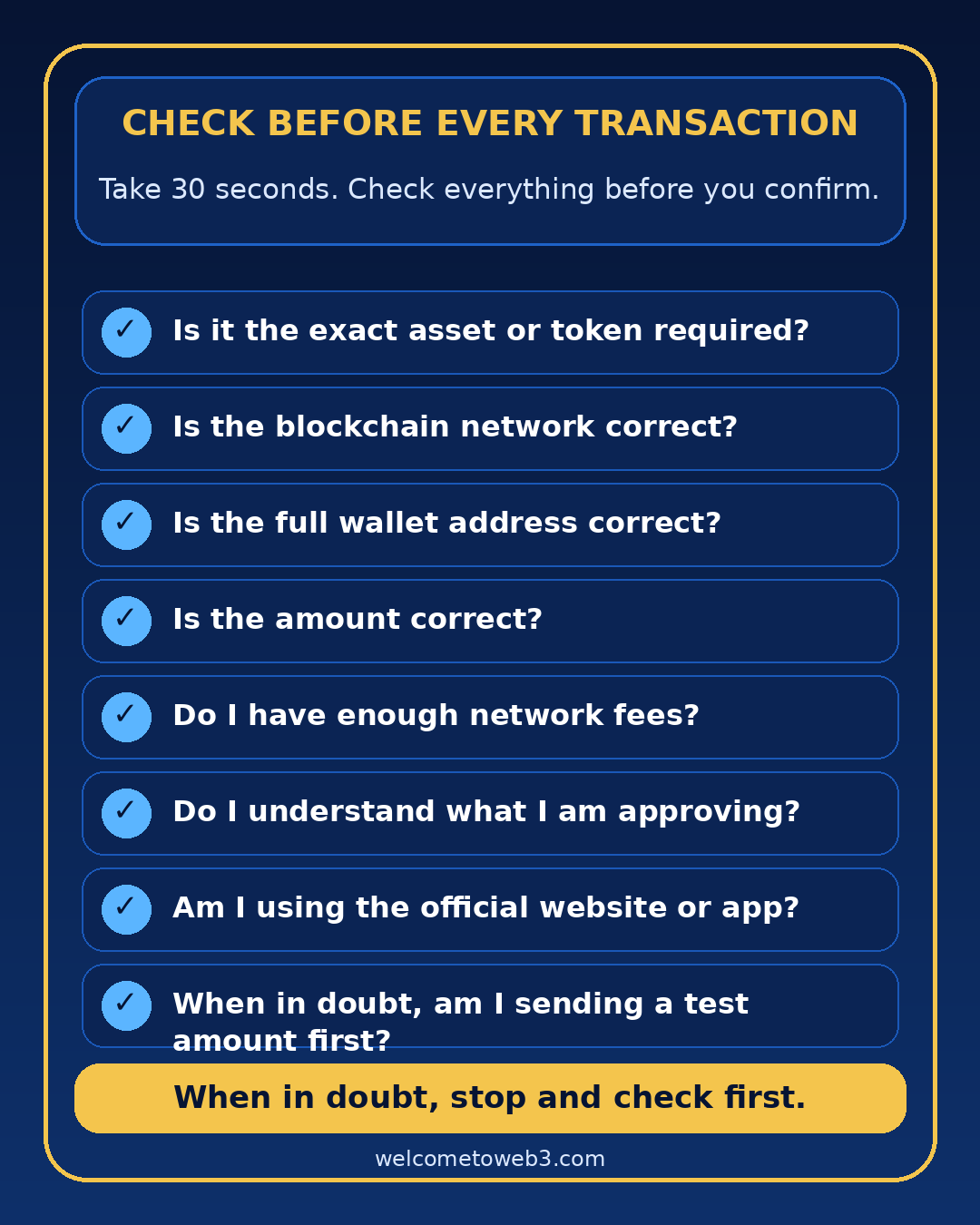
Remember: “Thirty seconds of checking can prevent an irreversible mistake.”
Click a question
You do not need to remember everything. Look it up again calmly whenever you are unsure.
No. You may share your wallet address to receive digital assets. Remember that transactions on public blockchains may be visible.
Your recovery words allow you to reopen your wallet on another device.
Check whether you selected the correct asset, whether you are viewing the correct network, whether the token has been added to the display and whether the transaction has already been processed.
Usually not. A confirmed blockchain transaction is generally final.
That asset is used to pay the network fees or gas fees.
Do not confirm anything. Check first or ask for help through an official channel.
No. USDC and USDT are different tokens. Always use the exact asset and network requested by the receiving wallet, exchange or service.
Remember: “Stop if you are unsure.”Checking before confirming is always the safest choice.
Quickly look something up
Type a word or browse the terms.
A digital network on which transactions are recorded.
Your personal access to digital assets and Web3 services.
The address you use to receive digital assets.
The secret words that allow you to reopen your wallet.
A platform where you can buy, sell or exchange digital assets.
A digital asset designed to maintain a relatively stable value, often linked to a traditional currency such as the US dollar.
A stablecoin linked to the US dollar that is available in the European Economic Area under a MiCA issuance structure.
A widely used global stablecoin linked to the US dollar. Availability and support can differ by region, exchange and service.
The blockchain on which a transaction is carried out.
The fee required to process a transaction. Also called gas fees.
A digital asset that exists on a blockchain network.
A digital program that automatically carries out certain actions.
Permission you give through your wallet for a specific action.
The function used to connect your wallet to a Web3 service.
Sending, receiving or approving digital assets.
Exchanging one token for another. In a regular swap, the blockchain network stays the same.
A method for moving assets from one blockchain network to another.
A website used to inspect transactions, addresses and smart contracts on a blockchain.
The unique identifier used to look up a blockchain transaction.
The on-chain cancellation of a token approval that was granted earlier.
No term found.
Remember: “You do not need to memorise every word.”
You have learned the basics
Use this guide whenever you are unsure and check each step calmly.
Test your knowledge and application
Level 1 tests what you know. Level 2 tests what you do with it.
Start with the basics or move to 20 practical situations involving wallets, tokens, networks, gas, smart contracts, approvals and revoke.
Remember: “Web3 does not have to be difficult.”Working calmly, checking carefully and acting safely make all the difference.
Web3 changes quickly. This date helps you assess how current the guide is.